Aniimo Console Pre-Order Packs: Where to Claim and Our Platform Checks
Claim your console pre-order pack inside Aniimo on the console platform where you bought it. The official FAQ says the contents go to the first character created on the purchasing console account, through in-game mail. Claim the mail, then use the items from your inventory. A store listing or a PC download button does not confirm that your pack has been received.
In this guide
Checked October 5, 2026. Below are our dated browser observations from a Windows desktop, followed by the documented in-game route. We did not complete a purchase, install a game client, or inspect an in-game mailbox in these checks.
Platform-by-platform checkpoints
Every row was checked on October 5, 2026. Links point to the actual landing address observed, including redirects. These results describe this browser session; they do not establish availability for every region, account, or device.
| Platform | Actual landing address | Action and visible result | Where our check stopped | Pack receipt verified? |
|---|---|---|---|---|
| PlayStation | PlayStation listing | Opened the official concept link. It redirected to the Korean store and displayed the PS5 product and add-ons. | Store page only; no purchasing-console session or in-game mail was inspected. | No |
| Xbox | Xbox US listing | Opened the product page. Its footer identified English (United States), and the page displayed platform and add-on information. | Product information; no pack entitlement or in-game mail was inspected. | No |
| Steam | Steam listing | Opened the listing, which appeared in Chinese, and clicked its free-play link. No game or mailbox confirmation became visible in the browser. | Client handoff and game launch were not verified. | No |
| Epic Games | Epic listing | Opened the English listing and clicked Get. The page still showed Sign in; no acquisition or pack confirmation became visible. | No authenticated acquisition or in-game session was verified. | No |
| Official PC launcher | Official website | Clicked Official PC Launcher. The website remained visible. | Launcher download completion, installation, login, and in-game mail were not verified. | No |
| Android | Google Play listing | Opened the official mobile link. Google Play displayed a message that the app was not available for this device. | Device availability prevented this browser session from establishing an install route. | No |
| iPhone / iPad | US App Store listing | Followed the official App Store link. It landed on the US listing with iPhone and iPad options. | Web listing only; no iOS installation, account session, or mailbox was inspected. | No |
The PlayStation store redirect is a store-region observation. It does not prove which Aniimo server an account will use. Likewise, the Google Play device message does not establish a worldwide Android restriction.
The documented console claim route
The official download and console FAQ, published September 14, 2026 and reread October 5, gives the following route in Console Questions 3 and 7:
- Log into Aniimo on the console platform used to purchase the pack, using that purchasing console account.
- Check the in-game mailbox of the first character created on that account.
- Claim the contents, then open your inventory to use or activate the included items.
- After eligible account linking, use claimed accessories and items on linked platforms within the same server.
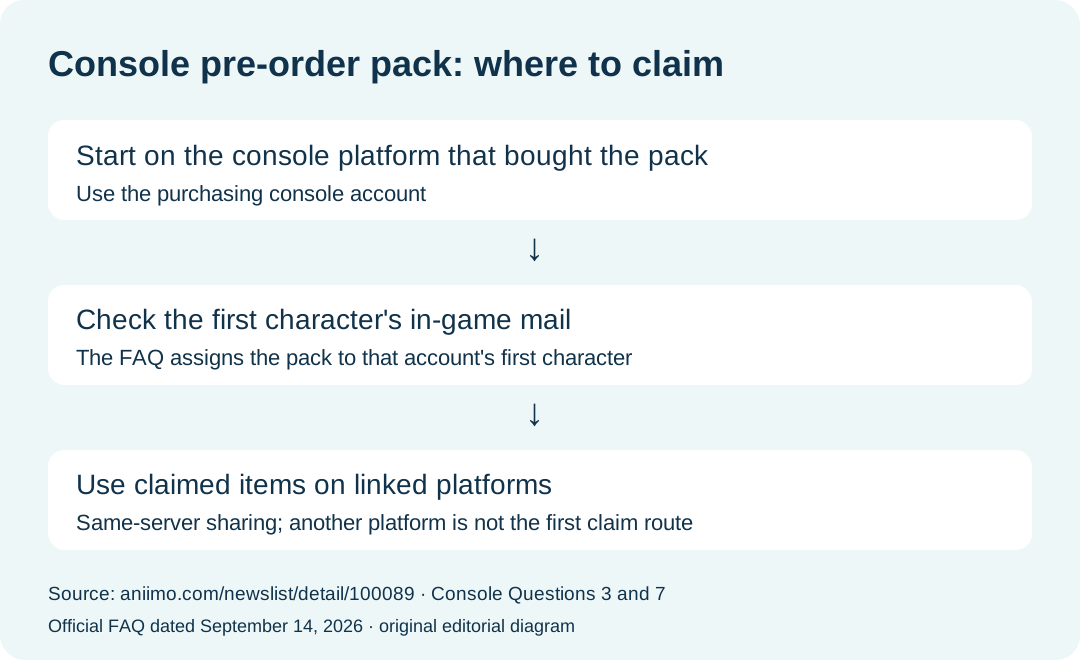
This diagram summarizes the official rule. It is not a screenshot of a successful claim.
Can I make the first claim on Steam, Epic, or mobile?
For a PlayStation or Xbox pre-order pack, the official answer is to claim it on the console platform where it was purchased. Console Question 7 permits use of already claimed items on linked platforms within the same server. That is different from making the initial claim elsewhere.
Does opening the store in the US prove my server is correct?
No. Console Question 5 says PlayStation assigns the server from the PSN account's registered region. A browser store URL is not a check of that account setting. The FAQ also states that progress is independent across servers. See our account and download guidance before linking an existing account.
Do I need PlayStation Plus or Xbox Game Pass to claim a purchased pack?
Console Question 6 says neither subscription is required to purchase and claim pre-order packs. This answer concerns the pack; it does not verify a particular cloud-streaming session or subscription entitlement.
What remains unverified in this check?
We have not verified purchase ownership, the identity of the first character, delivery of mail, inventory activation, or use on a second linked platform. Those need an actual eligible game session. The table records the furthest observable browser step, rather than treating a visible store page as a successful claim.
For separate beta rewards, use the beta rewards guide. For platform launch and compatibility details, use the release guide.