Aniimo Cloud Gaming: Where to Launch and What We Checked
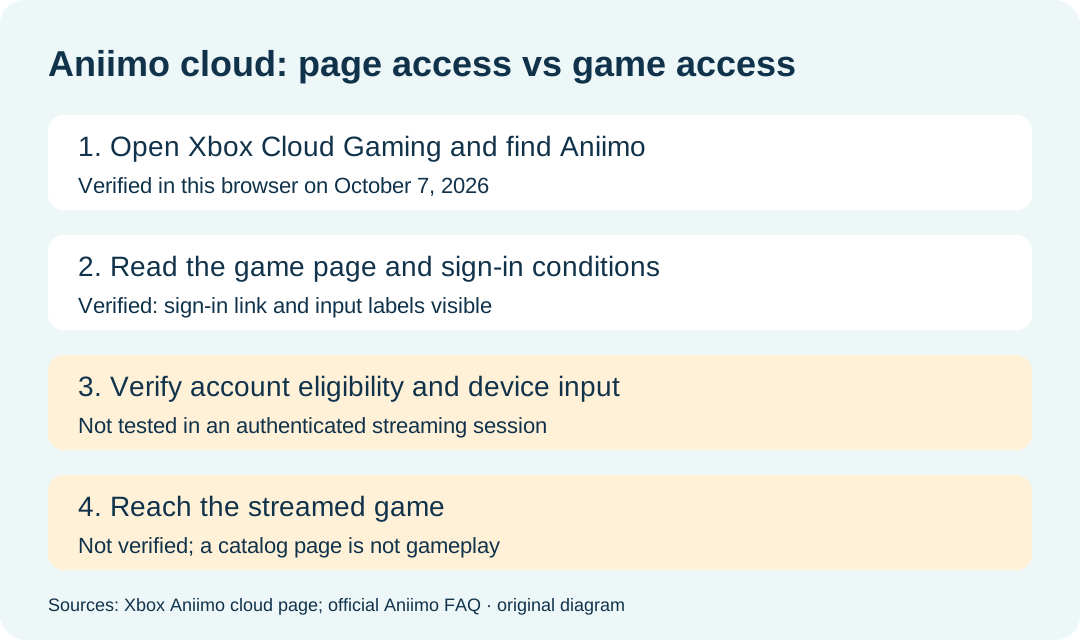
Start at Xbox Cloud Gaming, open the Aniimo page, and sign in with your Microsoft account. The official FAQ supports cloud streaming, but an accessible page does not prove your account can launch a session. Our October 7, 2026 Windows-browser check reached the Aniimo detail page and its sign-in step. We did not start the game or verify streaming entitlement.
In this guide
Direct route: Aniimo cloud game page. This is a streaming entry, rather than a PC launcher download.
Dated browser checkpoints
All rows were observed October 7, 2026, in the same Windows browser. They describe that session rather than every region or account.
| Checkpoint | Address or visible signal | Verified result | Still unverified |
|---|---|---|---|
| Cloud home | xbox.com/play | The Xbox cloud catalog loaded. | An actual streamed game. |
| Catalog entry | Aniimo link with controller and mouse/keyboard labels | Aniimo appeared in the cloud catalog. | Input behavior inside the game. |
| Game detail | Actual US-English landing | Description and cloud conditions were visible. | Account entitlement and regional eligibility. |
| Account step | Sign in link | No signed-in session was established by this check. | Login success or failure; we did not submit a login. |
| Input status | Missing-controller status | No controller was detected in this session. | Whether a particular controller or touch device works. |
| Conditions | Essential, Premium and Ultimate listed, with a purchase requirement notice | These conditions appeared on the public page. | An account-specific price or final eligibility decision. |
The game description calls the base game free to play, while the cloud conditions include a purchase requirement. We did not resolve that difference with a signed-in account. This observation is not a recommendation to buy a pack or subscription: inspect your live account prompt before paying.
Can I stream instead of installing the PC launcher?
The official Aniimo download FAQ, published September 14 and reread October 7, directs players to Xbox Cloud Gaming with a Microsoft account. It names phones, tablets, PCs and Xbox consoles as streaming devices. This is a separate route from installing the local launcher in our download guide.
The FAQ requires a fast, stable connection and says cloud playtime depends on account status. It does not establish a measured connection threshold for our browser session. We have no latency, queue-time or streaming-performance result to report.
Do I need a controller?
Our session reported no detected controller, but the Aniimo catalog also labeled mouse and keyboard support. A missing-controller status alone therefore does not establish that every other input route is unavailable. We did not test bindings, touch controls or an input device inside the game.
Does a free-to-play listing confirm free cloud access?
No account-specific access was verified here. The base game's pricing description and streaming eligibility answer different questions. We saw plan conditions on the public cloud page; we did not verify a free session, a current subscription price or a subscriber's session limit.
Does the US-English address prove availability in my country?
No. It records the page locale, not the user's physical location or a Microsoft account's regional eligibility. We did not change a VPN, account region or location setting in this check.
What counts as a successful launch?
An actual streamed game after account and input checks would establish more than a public page. Our check stopped before that stage: queue entry, video playback, character access and sustained gameplay remain unverified. The checkpoint diagram preserves that boundary.
For pre-order pack receipt, see the console pack claim guide. This cloud-page check did not test reward delivery.