Aniimo Mobile Download Stuck at 0% or Rolling Back: Choose the Right Route
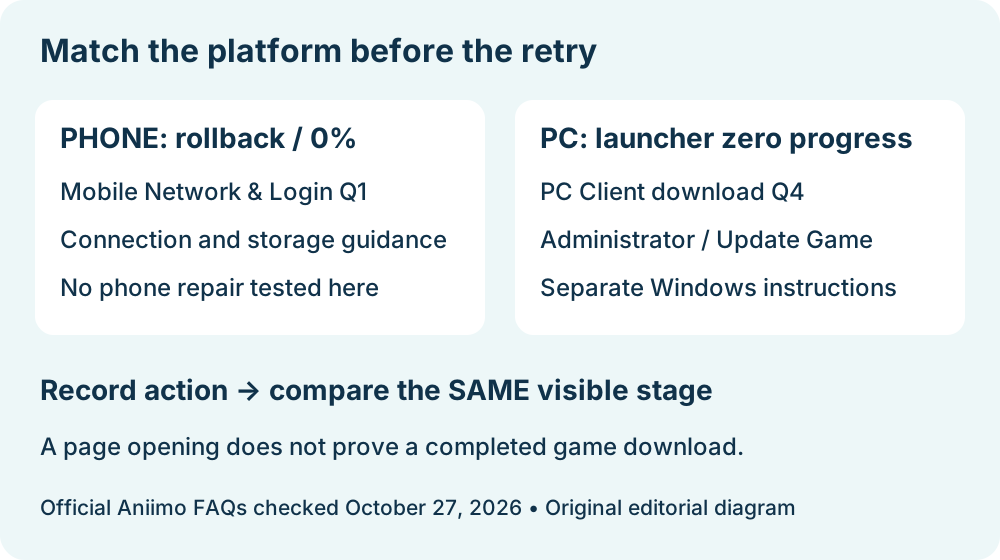
For Aniimo downloads that stall, roll back or remain at 0% on a phone, start with the mobile FAQ's connection and storage checks. The Windows launcher instruction to run as administrator and select Update Game is a separate PC route. A frozen percentage alone does not tell us which cause applies to your phone.
In this guide
Checked October 27, 2026 against Aniimo's September 22 mobile notice, Network & Login Question 1 and the September 14 PC FAQ, Client download Question 4. We read the published instructions; we did not reproduce a stalled phone download or demonstrate a repair.
Which route matches the screen in front of you?
Swipe or scroll sideways to compare all columns.
| Where the symptom appears | Relevant published route | What to keep separate |
|---|---|---|
| Aniimo mobile download stalls or rolls back | Mobile Network & Login Question 1 | A phone download is not the Windows launcher |
| Windows launcher progress or speed stays at zero | PC Client download Question 4 | Its administrator and Update Game steps belong to PC |
| Installation reports an incompatible Android device | Mobile Question 4 | Compatibility is a different question from download progress |
This is our routing table, assembled from the named answers. It is not a claim that these are the only possible symptoms. For the PC case, continue to the PC zero-progress guide. For an explicit Android compatibility message, use the Vulkan compatibility guide.
What does the mobile download answer actually suggest?
The mobile answer lists switching between Wi-Fi and mobile data, restarting the router and using 5 GHz Wi-Fi where available, and checking storage before another download attempt. It also discusses VPN, proxy, Private DNS and ad-blocking settings. Those are the developer's suggestions, not proof that any particular setting is causing this case.
We have not changed a phone, router or privacy setting. If you test a connection change yourself, note possible mobile-data charges and preserve the original setup. Our comparison method is to change one thing at a time and record the same visible download stage afterward; that method is an editorial aid, not a developer-mandated sequence.
Does the storage note give today's exact download size?
No. The September 22 notice asked for at least 18 GB of free storage before downloading, and its troubleshooting answer names low storage as a possible contributor to zero progress. That dated free-space instruction does not measure today's patch, remaining transfer or installed size.
Record the phone's actual available space and the date you read it. Leave the current required size unknown if the store or game does not show it. We have no phone storage reading for this guide, and we did not delete files or app data. The download overview covers the broader platform entry points.
When does the FAQ mention reinstalling or trying later?
The mobile answer offers reinstalling or downloading off-peak if the issue persists. It supplies no guaranteed waiting interval, completion time or recovery rate. We did not uninstall the app or test either outcome.
Before a disruptive retry, retain the exact message and account-access details privately. Do not treat an untested reinstall as a confirmed fix, and do not publish passwords, verification codes or account screenshots with the troubleshooting record.
What would count as a verified result?
Use a before-and-after record at the same stage. A successful web-page request, a store listing that opens, a completed resource download and entering the game are different checkpoints. None substitutes for another.
Swipe or scroll sideways to compare all columns.
| Field in our comparison note | What to enter |
|---|---|
| Date, time and timezone | When the observation was actually made |
| Platform and visible screen | Phone OS, app or store, and exact stage |
| Symptom | Percentage, rollback behavior and complete error text |
| Action completed | Only the change actually performed |
| Result at the same stage | Resumed transfer, unchanged behavior or unknown |
If it remains unresolved, the mobile notice lists [email protected]. This worksheet is our support aid, not an official required form. No phone transfer speed, repair success or game-login result was measured here. Return to Aniimo platforms to choose another guide.