Aniimo File Version Not Compatible With Windows: What to Check
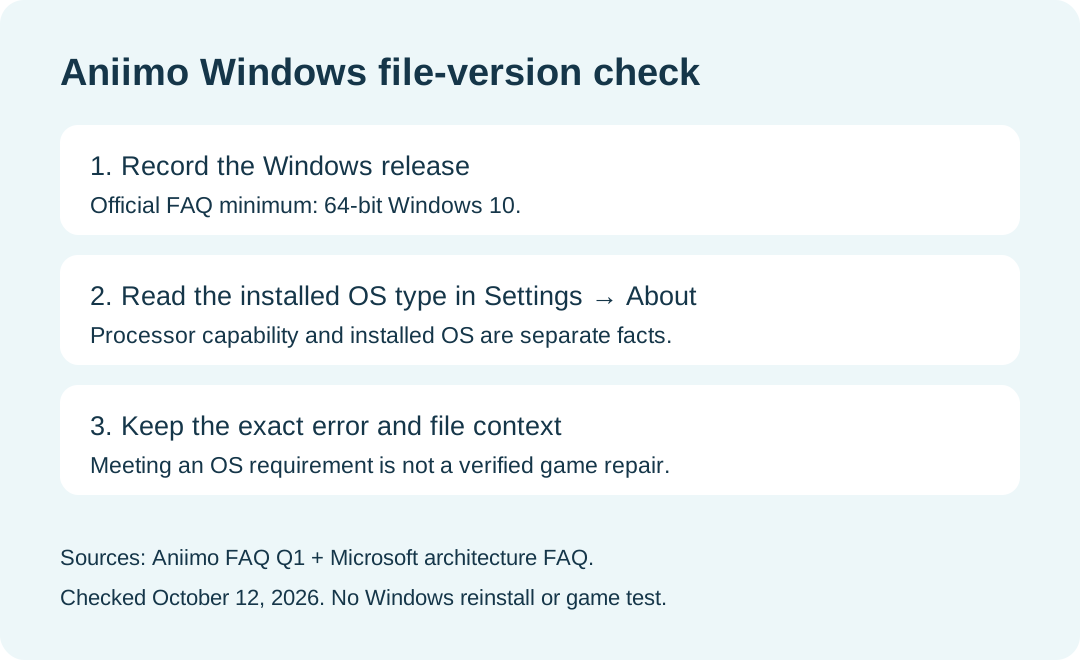
If Aniimo reports that the file version is not compatible with your Windows version, check both the Windows release and the installed operating-system type. Aniimo's official FAQ specifies 64-bit Windows 10 as its minimum and excludes Windows 7, Windows 8 and 32-bit systems. A processor capable of running 64-bit software does not by itself prove that 64-bit Windows is installed.
In this guide
Sources checked October 12, 2026: Aniimo's official FAQ, PC launch Question 1 and Microsoft's Windows architecture FAQ. This is a documented compatibility check, not a diagnosis or repair performed on a failing installation.
Record the two fields separately
Swipe or scroll sideways to compare all columns.
| Check | Why it matters | What the result can establish |
|---|---|---|
| Windows release | Aniimo names a minimum Windows release | Windows 7 or 8 does not meet the cited requirement. |
| Installed operating-system type | Aniimo also requires a 64-bit system | A 32-bit Windows installation does not meet it. |
| Processor capability | Microsoft distinguishes processor capability from installed Windows | A 64-bit-capable processor is not enough to establish the installed OS type. |
| Exact error and failing file | Our suggested comparison record | Keeps this error separate from a later white screen, login error or update problem. |
Where do I find System type?
Microsoft directs Windows users to Start → Settings → System → About. Under Device specifications, read System type. Record the full value rather than shortening it to a processor label. This is a read-only check; opening About does not install a different Windows edition or change the game.
Microsoft also explains how to distinguish the installed architecture from whether a processor supports a 64-bit operating system. Preserve those separate facts in a support note.
Does meeting the OS requirement guarantee Aniimo will launch?
No. Passing these two checks establishes the cited OS condition, not every hardware, file or launcher condition. Aniimo's FAQ does not supply a success probability for this error. We did not reproduce the error, inspect a failing executable or verify a successful launch.
If the recorded OS meets the requirement but the error remains, our recommendation is to retain the exact message and file context for support rather than invent a different cause.
Can I change 32-bit Windows to 64-bit with a setting?
Microsoft describes that transition as a reinstall involving the drive and installed software, not a switch in the About screen. This guide stops at identifying the current system. It does not instruct you to format a drive, reinstall Windows or assume the PC supports a particular replacement installation.
The game FAQ's suggestion to upgrade an outdated OS is not evidence that such an upgrade was performed or that it would resolve every instance of this message.
Is this the same as the white-screen or update-black-screen problem?
No. The cited FAQ separates the Windows file-version message from a white screen before the logo and a black screen after an old-version update. Match the actual trigger before applying a different answer.
What should I send support?
The official FAQ lists [email protected]. Our suggested note includes the date, exact error text, Windows release, full System type value and the file or action that produced the message. Mark unknown details unknown. We have not sent a report or received a support diagnosis.
For the broader processor, graphics, storage and platform requirements, use the Aniimo download guide. This page covers the named Windows compatibility error rather than replacing that requirements overview.